Tutorial · Dailymotion · Video Download
How to Download Dailymotion Videos (and Why the Copied URL Gets a 403)
Public Dailymotion videos are plain HLS with no DRM on everything we measured, yet the usual "copy the m3u8 into ffmpeg" trick fails with 403 Forbidden. This guide shows what the CDN actually checks, then the three routes that produce an MP4 with audio, each one tested on public videos the day this was written.
Quick answer
To download a Dailymotion video in 2026: install the Vidora Chrome extension, open the video (or the page that embeds it) and click Download; it resolves the HLS master from inside your browser and writes an MP4 with audio. From the command line, plain ffmpeg, curl and an old yt-dlp all get 403: the CDN only answers browser-like TLS sessions. Install yt-dlp[default,curl-cffi] and run yt-dlp URL; it retries "with Chrome impersonation" and succeeds. Your own uploads: Dailymotion Studio, Media, Videos, Download.
Dailymotion hosts a lot of video that exists nowhere else: local news segments, sports highlights, trailers, full catalogues from publishers who never went to YouTube. When one of those needs to be kept, the search results offer a wall of paste-a-link sites, and the technical advice you find elsewhere on this blog, capture the M3U8 URL and hand it to ffmpeg, runs into a 403 that no header seems to fix.
We hit that wall while building Dailymotion support into Vidora, so this guide starts with what the player really does and what the CDN really checks. Everything below was measured on two public videos on 29 August 2026, with the exact responses quoted. Skip to the methods if you only want the commands.
1. What Dailymotion lets you download officially
One feature, for one audience. If you uploaded the video, Dailymotion Studio has a Download entry: open Media, then Videos, open the menu on the video and choose Download (this is documented in Dailymotion's help article "Download videos"). Viewers get nothing: no button on the watch page and no offline mode in the web player.
So for anything you did not upload, the question is purely technical: how does the player get the video, and can another client do the same?
2. How the player actually loads the video
Open a watch page, an embed, or a dai.ly short link, and the player makes one request that decides everything:
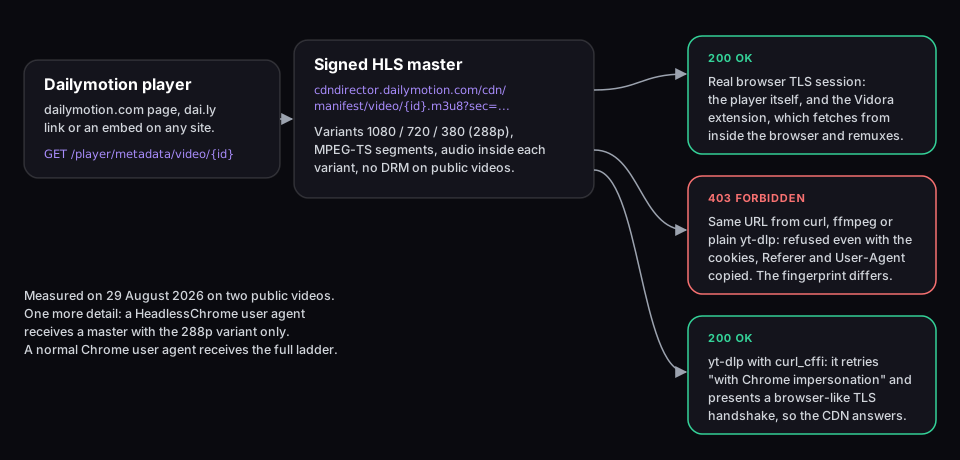
GET https://www.dailymotion.com/player/metadata/video/{VIDEO_ID}?embedder=...&locale=enThe JSON answer contains the title, duration, thumbnails, a subtitles list, and a qualities object whose auto entry is a single URL: the HLS master playlist on cdndirector.dailymotion.com/cdn/manifest/video/{VIDEO_ID}.m3u8, followed by a long sec= signature. Two more fields matter for this guide. stream_formats lists the renditions that exist for the video (for example {"380": "mpegts", "1080": "mpegts"}), and protected_delivery was false on every public video we checked: no Widevine, no FairPlay, just HLS.
The master playlist lists one variant per rendition, named after Dailymotion's internal labels: NAME="1080" for 1920x1080, NAME="720" for 1280x720, NAME="380" for 512x288. Each variant carries both codecs (avc1 video and mp4a.40.2 audio) inside MPEG-TS segments, so there is no separate audio rendition to merge, which is one problem fewer than on Loom or Vimeo. If HLS playlists are new to you, the beginner guide to M3U8 and HLS covers master playlists, variants and segments in plain language.
3. Why the copied m3u8 URL answers 403, measured
The standard trick, described in our guide to finding any stream's M3U8 URL, is to copy the manifest URL from the Network tab and pass it to ffmpeg, adding the Referer and cookies when the CDN wants them. On Dailymotion that stops at the first request. Here is exactly what we tried against a freshly issued master URL:
| Client | Headers sent | Result |
|---|---|---|
| Browser page (fetch from dailymotion.com) | whatever the page sends | 200, full master |
| curl | Chrome UA only | 403 |
| curl | Chrome UA + Referer geo.dailymotion.com (what the player sends) | 403 |
| curl | Chrome UA + all 16 cookies of the browser session | 403 |
| curl | cookies + Referer + Chrome UA, master issued to those same cookies | 403 |
| ffmpeg -headers | Referer + Chrome UA | 403, "Server returned 403 Forbidden" |
| yt-dlp 2024.04 (Ubuntu package) | its defaults | 403 on the m3u8, "No video formats found" |
| yt-dlp 2026.08.19, standalone binary | tries "Chrome impersonation" | error: impersonate targets not available |
| yt-dlp 2026.08.19 with curl_cffi | Chrome impersonation | 200, formats listed, download OK |
The pattern is unambiguous. Nothing you can put in a header unlocks the manifest; what the CDN accepts or refuses is the client fingerprint (the TLS handshake and HTTP/2 settings that distinguish Chrome from curl or ffmpeg). That is exactly the check yt-dlp's Dailymotion extractor now works around: its log says "Downloading m3u8 information with randomized headers", then "Retrying m3u8 download with Chrome impersonation", and only the second attempt succeeds. Copying the request as cURL from DevTools therefore does not help either: the headers are right, the handshake is not.
One more measurement worth knowing if you automate anything: with a HeadlessChrome user agent, the master we received listed the 288p variant only. With a normal Chrome user agent, the same video listed 1080p and 288p. If a script of yours downloads Dailymotion at a mysteriously low quality, this is why.
4. Method 1: Vidora, from inside the browser
Because the CDN trusts the browser's own TLS session, the simplest place to fetch the video is inside the browser. Vidora is a Chrome extension with a dedicated Dailymotion resolver: it calls the same metadata endpoint the player calls, takes the qualities.auto master URL, fetches it from your browser (where it gets 200), then downloads the MPEG-TS segments of the rendition you picked and remuxes them into a single MP4. No re-encoding, no server of ours in the path, no URL sent anywhere except to Dailymotion itself.
Where it works today, precisely
Two situations. The first is covered by Vidora's automated end-to-end suite, which downloads a public trailer and checks the file with ffprobe for a video stream and an audio stream; the second was verified the same way on 29 August 2026 (57.5 s file for a 58 s trailer), and its fixture runs on request because Dailymotion's answers vary by region:
- Dailymotion players embedded on other sites (news articles, blogs, forums, any page with a
dailymotion.com/embed/video/…iframe). Supported in the build published on the Chrome Web Store (1.0.59, released 28 August 2026): the extension spots the iframe when the page loads and resolves the video without you pressing play. - Watch pages on dailymotion.com itself and
dai.lylinks. On dailymotion.com the player is not an iframe, and the published build only saw the page's Open Graph tag, which points to a crawler page rather than a video: the entry it listed could not download. We fixed that on 29 August 2026 by running the same resolver on watch pages; the fix passes the end-to-end test and ships in version 1.0.60, published on the Chrome Web Store on 31 August 2026. Until your extension shows 1.0.60 or later on chrome://extensions, use method 2 on dailymotion.com pages, or open the video through a page that embeds it.
Step-by-step
- Install Vidora from the Chrome Web Store. Chrome, Edge, Brave and other Chromium browsers; no account, no email. Free during launch.
- Open the page with the video. Detection runs when the page loads; you do not need to press play.
- Click the Vidora icon in the toolbar. The popup lists the video with its title and, when the playlist offers several renditions, a resolution picker. The default is the best rendition up to 1080p.
- Click Download. The MP4 lands in your Downloads folder with the audio in place, at the bitrate Dailymotion serves.
Several videos on one page, for example a page that embeds three clips, are all listed and can be queued with the popup's "Download all" button, two at a time. For a whole channel or playlist, method 2 is the better tool; Vidora works page by page.
5. Method 2: yt-dlp with browser impersonation
yt-dlp has a Dailymotion extractor that does the whole dance: access token, metadata JSON, master playlist, segment download, MP4 output. The catch, shown in the table above, is that the CDN step only succeeds when yt-dlp can impersonate a browser, which needs the optional curl_cffi dependency. The Ubuntu package (2024.04 at the time of writing) is too old and fails outright; the standalone Linux binary we tested (2026.08.19) is recent but could not impersonate. You also need ffmpeg on the PATH: yt-dlp fetches the segments and hands them to ffmpeg to write the MP4. Install yt-dlp with pip and the extra:
python3 -m pip install -U "yt-dlp[default,curl-cffi]"Then list what the video offers, and download the rendition you want:
yt-dlp -F https://www.dailymotion.com/video/VIDEO_ID
# measured on a 58 s public trailer:
# ID       EXT RESOLUTION |  FILESIZE   TBR PROTO | VCODEC       ACODEC
# hls-380  mp4 512x288    | ~ 3.18MiB  461k m3u8  | avc1.42001e  mp4a.40.2
# hls-720  mp4 1280x720   | ~14.86MiB 2149k m3u8  | avc1.64001f  mp4a.40.2

yt-dlp -f hls-720 -o "%(title)s.mp4" https://www.dailymotion.com/video/VIDEO_ID
Omit -f to take the best rendition. The download log shows the impersonation retry explicitly, which is a useful sanity check: if you see "Retrying m3u8 download with Chrome impersonation" followed by a format list, the setup is right. If you see "none of these impersonate targets are available", curl_cffi is missing from that Python environment or from that binary. yt-dlp also accepts dai.ly links and, per its extractor list, Dailymotion playlist and user URLs; we verified single videos only. For the wider set of command-line options, see the comparison of free M3U8 downloader tools.
What about ffmpeg alone? Not on Dailymotion. ffmpeg has no TLS impersonation, so the -c copy remux described in our M3U8 to MP4 guide never gets the playlist. Let yt-dlp fetch; it still uses ffmpeg under the hood to write the MP4.
6. Method 3: your own videos, via Dailymotion Studio
If the video is yours, skip everything above. Sign in, open Dailymotion Studio, go to Media, then Videos, open the menu on the video and choose Download. It is the only download Dailymotion officially supports. Keep the original file you uploaded as well.
7. Edge cases: dai.ly, embeds, private, geo, quality
dai.ly short links
dai.ly/VIDEO_ID redirects to the watch page with the same ID. Both methods accept either URL.
Embedded players on third-party sites
The iframe URL is dailymotion.com/embed/video/VIDEO_ID. Vidora resolves it in place. For yt-dlp, read the ID out of the iframe (F12, Elements panel, search for dailymotion.com/embed) and use dailymotion.com/video/VIDEO_ID. The general technique is in how to download embedded videos from any page.
Private, password-protected and geo-blocked videos
For these the metadata endpoint returns an error object instead of a playlist (the JSON also carries an is_password_protected flag). Vidora's resolver stops there and lists nothing; yt-dlp reports the error. Neither tool bypasses access control, and this guide does not cover ways to. Geo-blocking is evaluated on Dailymotion's side from your connection: a video that plays for you can be saved, one that does not play cannot.
Quality and file size
You get the renditions the uploader's file produced, commonly 720p or 1080p plus the 288p fallback. Vidora defaults to the best rendition up to 1080p and shows the others in the picker; yt-dlp -F shows the estimated size per rendition. Because each rendition already contains its audio, there is no "video with no sound" failure mode here, unlike Loom or Vimeo.
Subtitles
The metadata JSON lists caption tracks under subtitles.data when the uploader provided them. Vidora does not expose Dailymotion captions today. yt-dlp can save them with --write-subs (and --sub-langs to choose), as with any site its extractor supports; we did not test a captioned Dailymotion video for this guide.
8. Legal notes
Downloading video from the internet sits in a nuanced legal space, and nothing here is legal advice. Three factual points. Your own uploads are yours to download, and Dailymotion provides the button. For other people's videos, Dailymotion's Terms of Use govern what you may do with content on its service, and saving a private copy of something you can legitimately watch is treated very differently from re-uploading or redistributing it. Dailymotion does not apply DRM to the public videos we measured, so neither method circumvents a technical protection measure; access-controlled videos (private, password, geo) are out of scope for both tools by construction. When in doubt, the question is about your right to keep the recording, not about which tool you use.
9. Frequently asked questions
Can you download videos from Dailymotion?
Yes. Dailymotion itself only offers a Download button to the uploader, in Dailymotion Studio. As a viewer you need a tool that runs inside a real browser session or imitates one: the Vidora Chrome extension, or yt-dlp installed with the curl-cffi extra. The public videos we measured are plain HLS with no DRM.
Why does the Dailymotion m3u8 URL give 403 in ffmpeg or curl?
The signed manifest URL on cdndirector.dailymotion.com is only served to clients whose TLS handshake looks like a browser. Copying the cookies, Referer and User-Agent does not help; we tested every combination and got 403 each time. That is why plain yt-dlp fails and yt-dlp with browser impersonation succeeds.
How do I download a Dailymotion video on Mac?
Same two routes as on Windows or Linux. In Chrome, Edge or Brave on macOS, install Vidora and open the video. In Terminal, install Python 3, run python3 -m pip install -U "yt-dlp[default,curl-cffi]", then yt-dlp the video URL. Safari cannot run Chrome extensions.
What quality can I get from Dailymotion?
Whatever the uploader provided, typically 720p or 1080p plus a 288p fallback. The master playlist names them 1080, 720 and 380. Vidora takes the best rendition up to 1080p by default and shows a picker; yt-dlp -F lists them and -f picks one. Audio is inside every rendition, so there is no separate audio track to merge.
Does Dailymotion use DRM?
Not on the public videos we measured: the metadata reports protected_delivery: false and the playlist carries plain MPEG-TS segments. Some partner or premium content may be delivered differently; if a video refuses to download in a tool that works elsewhere, that is the first thing to suspect.
Do dai.ly short links work?
Yes. dai.ly/ID redirects to dailymotion.com/video/ID. Both Vidora and yt-dlp accept either form; the video ID is the same.
Can I download a private, password-protected or geo-blocked Dailymotion video?
Password-protected and private videos return an error from the metadata endpoint instead of a playlist, so neither Vidora nor yt-dlp can resolve them; nothing in this guide bypasses access controls. Geo-blocked videos behave the same way from a blocked country. If you can play the video, it can be saved; if you cannot, no downloader can.
Can I download my own Dailymotion videos?
Yes, officially. In Dailymotion Studio open Media, then Videos, open the menu on the video and choose Download. That is the only download feature Dailymotion offers, and it exists only for the uploader.
About the author
Romain Gouraud is the founder of RGC Digital LLC and the engineer behind Vidora, a privacy-first video downloader Chrome extension for Vimeo, Wistia, Loom, Dailymotion, Bunny.net, HLS streams and MP4. The measurements in this guide come from building and testing the extension's Dailymotion resolver, including the 403 wall that shaped it.